
Building a new template or contained template from scratch can be very time consuming and risk of making a mistake in a script, missing function or graphics is just another factor against doing it manually.
But there is no copy/paste method for this. Galaxy dump only works for instances and all of a sudden it seems like you have to do it manually. But we have to think a little different, so see the possible solution, to make a copy of a existing template.
If you have instances of your template, rename it before export, to the new template name you want and rename it back after the export.

Export the template or contained template that you want to make a copy of.

Save it anywhere, it is not important to save for this demonstration. If you have a set of finalized templates in your engineering system, you could have them all exported as Type_00, so they were always ready to import to make a new type.

A list of all the exported objects is presented, it is important that you have all the child objects in a contained template selected as well, else you will only export the parent of the contained template.

If you did not rename the original template to start with, now is the time to rename the original to something else, to make it possible to import it again where it can only get its original name it was exported with. This is how you get a copy with a new name.

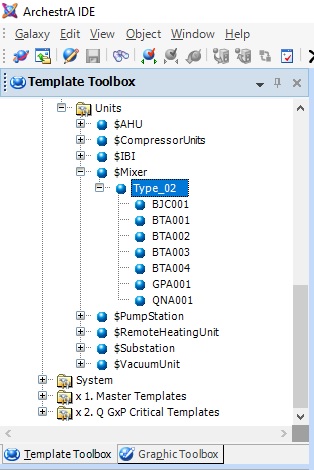
The new copy Type_02 of the original Type_01 is now done, but Type_01 is missing until we import it again.
Import objects to get the original Type_01 template back.

Import preferences can be used as default.

Import was successful with all objects imported. Some of the basic templates are skipped as there is no changes to them, they are merely the parents of the objects in the contained template.

Now we have two identical contained templates of Mixer and we can start making the required changed to Type_02 in order to make the changes needed for the new type, but still have the same functionality as Type_01, but without building it all from scratch.

If your original Type_01 contained template had instances, those are now referring to Type_02, so it is important to do a few steps differently if you have instances. Rename the original before export, to the new template name and rename the original back to its original name before import of the new template.
Discover more from SCADA, PLC and Automation Engineering
Subscribe to get the latest posts sent to your email.
Why would they do it this way? It’s very time consuming.