
Creating a new galaxy from the Default.cab file in the galaxiesbackup folder, gives you a Template Toolbox structure to start working with, instead of a empty canvas. It is however important to create your new automation objects in the right manner in order to give yourself the most possibilities to enforce future changes on all derived objects.
The fundamental idea is that ALL changes are done in templates and NEVER in the deployed instances.

Protected Default Templates
The protected default templates all have a small orange lock in the upper left corner of their icon. These can primarily be seen above like $AppEngine, $AnalogDevice and $ViewApp in the “System” or “4. ViewApps” folders.
Master Templates
The protected templates can not be changed, to inforced changes to derived templates, and should only be used to create derived master templates from. These derived master templates are seen in the “_Default templates” folder and now all have a prefix “Master_” to indicate that it is the most basic template derived from the protected template.
Derived and Contained Templates
If you create 10 AppEngines from the orange lock protected template in System folder, you can not change the scan time of all 10 instances once they are deployed, you would have to change the scan time on each instance. This is the power of using a master template derived from the protected template, it is possibly to change the scan time on the master template for all 10 instances at once.
A New and Better Way to Sort Your Templates
This is a suggestion on how to sort the default template toolbox and how derived and contained templates llive their life in the toolbox and what they look like in the model view.

The new layout of the template toolbox is simplified to two main folders called “_Default Templates” and “Production Templates”. All protected templates and “Master_” templates are hidden away in the first folder as these are rarely to be used once you have created all your derived production templates which also have contained templates.
The $Base template in the “Production Templates” -> “Components” -> “Base” folder is based on protected template “$UserDefined”. All other production templates is derived from the $Base template. The purpose of the $Base template is to have a place where all scripts common for the different inputs and outputs can be handled as well as basic graphic symbols.
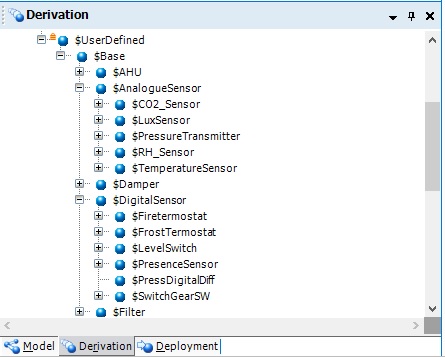
Derivation View
In the derivation view it can now be seen how the different toolbox templates is derived from each in other to make it possible to make overall changes to many derived templates and their instances.
Here it is possible to makes changes for all automation objects in the system by changing $Base or for all digital inputs by changing $DigitalSensor.
Discover more from SCADA, PLC and Automation Engineering
Subscribe to get the latest posts sent to your email.