
According to my plan in Home Network Security – The Idea (part 1), there is some hardware that I need to source and buy. I do not have any affiliation with the mentioned brands or shops, these are just my personal choices from my own use-case scenario.
- Computer with minimum dual network interfaces for the OPNSense firewall
- Managed Switch with 16 ports
- WIFI Access Point
I already have a Lenovo ThinkCentre M910q that is running Proxmox with Home Assistant. I imagined that I could also run a pi-hole DNS server in another virtual machine on this.
My budget was set at around 5000 Dkk. which corresponds to about 666 €.
Finding a computer to run OPNSense
When searching for “opnsense hardware”, it is hard to miss Home Network Guy, as he has also covered a lot of other topics on home network setup and security. I recommend to check out his 2025 hardware comparison: https://homenetworkguy.com/review/opnsense-hardware-recommendations/
I also considered buying an official OPNSense hardware firewall, but the price tag would swallow my entire budget of 600€ for finding the 3 hardware pieces listed above.
As we need at least two ethernet interfaces, this limits the amount of available hardware, unless we want to install dedicated network cards. A machine that can host additional network cards, usually also means its physically larger and power consumption is most likely larger as well. For equipment that has to run 24/7, power consumption is worth considering. Finding a low energy computer, could pay itself off in the long run.
There is a load of different mini PCs, with multiple network interfaces, to find on all the big tech seller websites. Like those listed in Home Network Guy’s posts.
Import taxes and duty can quickly make cheap hardware much more expensive, as the Danish VAT is at 25% + duty fees. Buying from sellers with prepaid VAT for importing to the European Union can be a wise choice, to avoid nasty surprises.
I focussed on finding a mini PC, for the low power consumption, with dual 2.5Gb network interfaces, a decent CPU and at least 16GB of RAM.
A lot of searching led me to find a refurbished Minisforum TH50, that I got for 219€.
I settled with the limitations of RAM not being expandable, as my main requirements for CPU, RAM and Ethernet interfaces were met at a decent price.

| Model | TH50 |
| Processor | Intel® Core™ i5-11320H Processor. 4 Cores/8 Threads(8M Cache, up to 4.50 GHz) |
| Memory | LPDDR4 16GB (On Board) |
| Storage | M.2 2280 256GB PCIe SSD |
| Storage Expansion | 2.5 inch SATA HDD Slot×2 (SATA 3.0 6.0Gb/s) |
| Wireless Connectivity | M.2 2230 WIFI Support (Dual-Band Wi-Fi, BlueTooth) |
| Peripherals Interface | RJ45 2.5 Gigabit Ethernet Port ×2 USB 2.0 Port ×2(Left Side Of The Back)USB 3.1 Port ×4(Gen2)Clear CMOS ×1 |
The refurbished unit came in a new box, with all extras and cables new in bags. The computer itself had minor scratches and use marks, but nothing worth complaining about.
Finding a managed 16 port switch
I went looking for a 16 port managed switch, with PoE and positive reviews. From Reddit r/homeLab and Home Network Guy, Grandstream switches was recommended from their feature-richness to the price.
I do not know enough about switches, so I went with a summation of recommendations from forums and blog posts.
I found the Grandstream GWN7802P model at 213€ from a local IT electronics webshop in Denmark.

Finding a WIFI Access Point
I wanted better coverage and expandability than I had in my current Google Wifi setup, with 3 mesh points. It never got to work together with my ISP supplied routers built in WIFI and Mesh+ support. So I essentially ended up with 3 different WIFI networks. Google WIFI, Routers 2.4 GHz and 5 GHz.
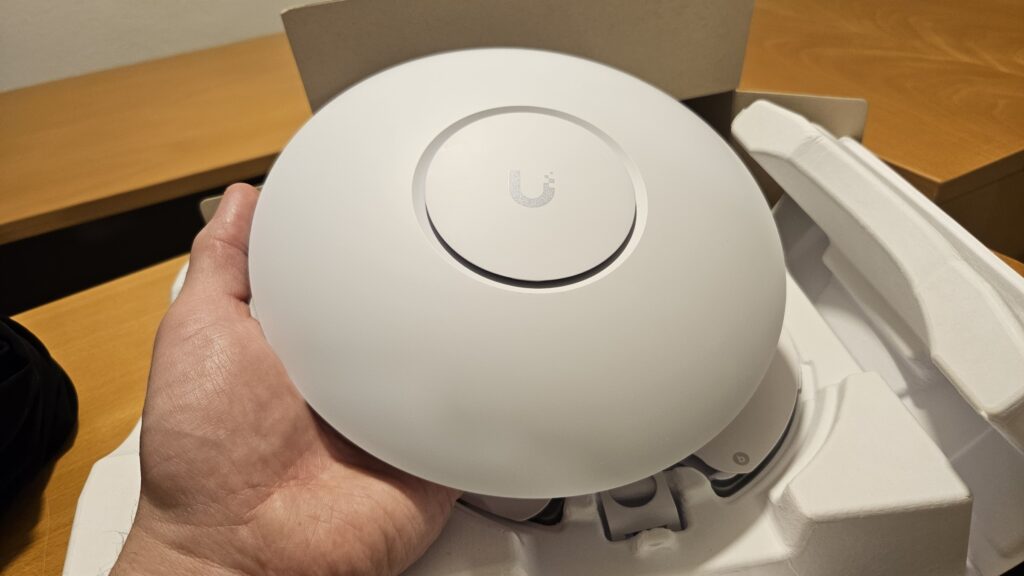
Reading posts on Reddit r/HomeNetworking, Home Network Guy and eventually reading up on details on Reddit r/Ubiquiti, the Ubiquiti U6 Pro seemed like a well proven choice, good coverage, expandable and supports enough VLANs for my initial plan.
Ubiquiti and UniFi is also praised for their good software and interfaces, something I can benefit from, as knowing very little about WIFI APs.
I ended up finding the Ubiquiti UniFi U6 Pro from a local Danish IT electronics webshop at 169€.
Conclusion
Finding the right computer to run the firewall took much longer, than rounding up recommendations for switch and access point. There is generally just a lack of cheap / accessible brand name mini PCs, and the amount of different firewall specific mini PCs is overwhelming to get through and compare.
I ended up spending a total of 601 € + shipping, which is just shy of my budget, but spending some money on a bunch of ethernet cables, power bars etc. got the total up around there anyway.
Discover more from SCADA, PLC and Automation Engineering
Subscribe to get the latest posts sent to your email.