When you have finally made your own functions, function blocks and awesome code, it really sucks to see that it appears under (Miscellaneous) in the Library Manager. We really just want our Codesys library to appear under our own category.

In your library project, go to “Project Information” and you will find a popup box for adding Library Categories, but you can only choose to use categories from other libraries, so you could get it placed under “Application”. You can also choose to add a “From Description File…”

In the Codesys Help you can find a chapter on making libraries and which rules apply to do it correct. https://help.codesys.com/webapp/categories;product=LibDevSummary;version=3.5.17.0 In this article, it is mentioned that the file LibraryCategoryBase.libcat.xml follows all installtions of Codesys in a project example folder. So you just need to search for it!

The file contains a long list of all the categories that Codesys uses, also some internal test categories that you have never seen before. It can seem confusing that you need to use a <ID> of which you do not know where to get!

The <ID> is a GUID and you can just generate one from any kind of GUID generator. https://www.guidgenerator.com/online-guid-generator.aspx.
It is not something special made by Codesys, but a general agreed upon feature on how to generate unique keys with a very low probability of being duplicated.

Choose a part of the file that you can modify to add your own category. Here I have only changed the comment, the <Id> and the <DefaultName>.

The standard code that I modified for the above.
<?xml version="1.0" encoding="UTF-8"?>
<LibraryCategories xmlns:xsi="http://www.w3.org/2001/XMLSchema-instance" xsi:noNamespaceSchemaLocation="LibraryCategories.xsd">
<!--   Application   -->
	<LibraryCategory>
		<Id>E98088BB-59F5-4096-8784-4443932920DF</Id>
		<Version>1.0.0.0</Version>
		<DefaultName>Application</DefaultName>
	</LibraryCategory>
</LibraryCategories>
Save the xml file and go back to the browse dialog for your category description file.
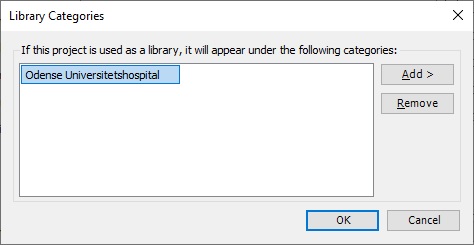
You might have to close down the Codesys IDE to get the library manager to update your new categories.

Beckhoff TwinCAT is based on Codesys, so the above description works for Beckhoff Library categories as well. It is just a bit more mysterious as Beckhoff does not supply the referenced Codesys example project with the xml files in. Check out Jakob’s article on how he did it for TwinCAT: https://alltwincat.com/2018/08/16/library-categories/
Discover more from SCADA, PLC and Automation Engineering
Subscribe to get the latest posts sent to your email.